⭐ Lesson 4.1: Clones — One Sprite, Many Copies
Welcome to Module 4! Real games are crowded — a sky full of raindrops, a swarm of enemies, a shower of stars. In this lesson you'll learn how one sprite can stamp out as many copies of itself as you need, and you'll build a sky of falling stars that becomes the heart of our capstone game.
📚 What You'll Learn
By the end of this lesson, you will be able to:
- Explain what a clone is, using the rubber-stamp idea
- Use the three clone blocks: create clone of myself, when I start as a clone, and delete this clone
- Use the "hidden original makes clones in a forever loop" pattern
- Know what a clone copies from the original — and why you must clean clones up
- Coach your child through their first "many things at once" project
Estimated Time: 40 minutes • Project: a shower of falling stars
In This Lesson
🎓 Learn It: Why one sprite isn't enough
In the apple game from Lesson 3.2, one apple fell at a time. What if you wanted twenty?
You could duplicate the sprite twenty times — until you decide the apples should fall faster and have to edit all twenty. Clones fix this. A clone is a copy of a sprite that Scratch makes while the program is running. You write the code once; the sprite makes as many copies as it needs, then throws them away.
Think of a rubber stamp. The stamp stays in your hand; each press leaves a print. Change the stamp, and every print after that changes too. In Scratch, the original sprite is the stamp, and clones are the prints.
🎓 Learn It: The three clone blocks
All three live at the very bottom of the orange Control category, below the loops and if blocks.
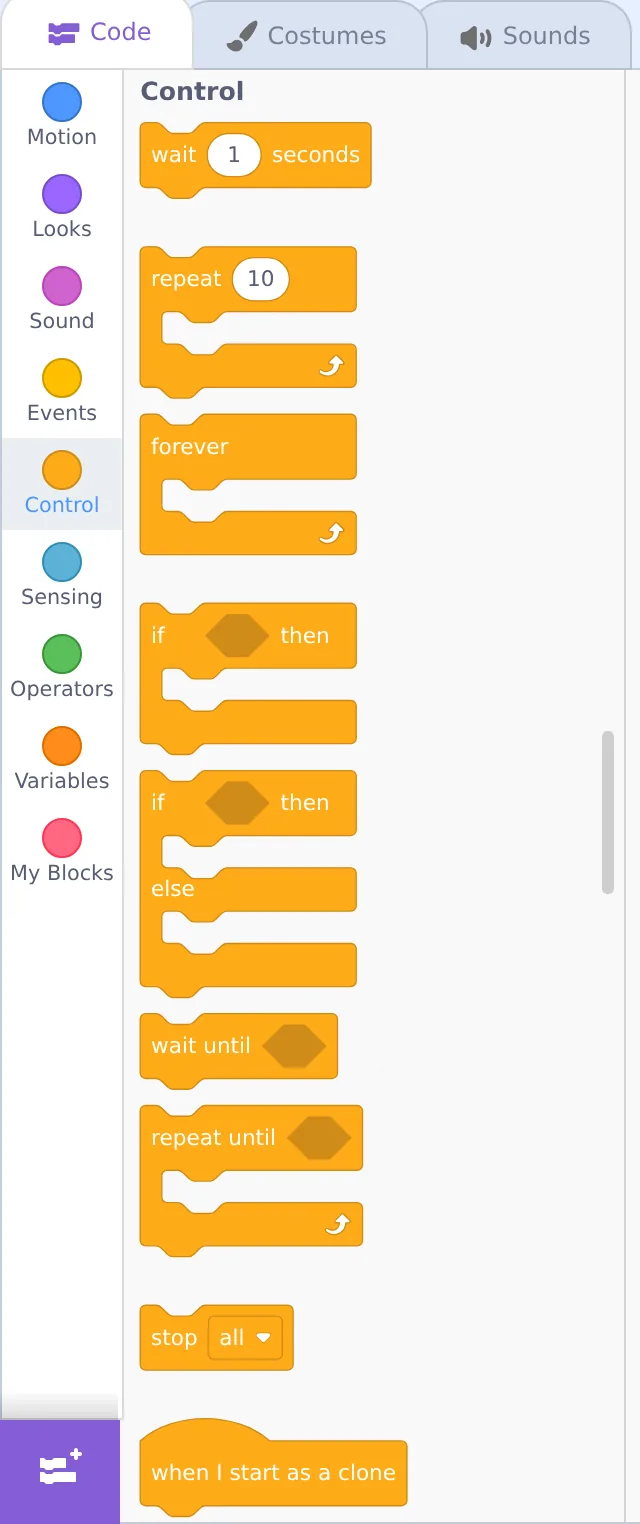
| Block | What it does | Stamp analogy |
|---|---|---|
| create clone of [myself] | Makes a new copy of the sprite right now | Press the stamp down |
| when I start as a clone | A hat block that runs only on each new clone — never the original | What each print does after it lands |
| delete this clone | Removes the clone that runs it | Wipe the print away |
The original (the stamp)
Each clone (the prints)
This two-script shape is the pattern for almost every clone project. Don't skip the wait — without it, the loop stamps clones as fast as the computer can go.
The stamping loop runs forever; the clone steps happen once for every clone, all at the same time.
🎓 Learn It: How clones behave
Four rules explain almost every clone surprise:
- A clone is born as an exact copy of the original — same spot, direction, costume, size, and effects. It even copies being hidden. So move the original before stamping, and start the clone script with show.
- Each clone runs its own copy of the clone script, side by side, each minding its own business.
- "when 🟩 clicked" runs only on the original. Clones are made after the flag is clicked, so they miss it. (Hats like when I receive and when this sprite clicked run on the original and every clone.)
- Always clean up. Scratch allows about 300 clones at once; after that, create clone quietly does nothing. Off-screen clones still count, so every clone needs a way to reach delete this clone. The red stop sign clears them all.
🛠️ Try It: Build falling stars
Let's put the pattern to work: a new star every second, appearing at a random spot along the top and drifting down.
💡 Before you start
Start a new project. Hover over the cat face button in the bottom-right corner, click Choose a Sprite, and pick Star. A dark backdrop such as Stars or Night City makes the stars pop.
-
Program the stamp (the original)
With the Star selected, build this. The original hides, then forever jumps to a random spot along the top, stamps a clone, and waits.
when ⚑ clickedhideforevergo to x: pick random -220 to 220 y: 180create clone of myselfwait 1 secondsClick the green flag. Nothing visible happens — and that's correct! The clones exist, but they're hidden, like prints in invisible ink.
-
Program the prints (each clone)
In the same Star sprite, start a second script. Each clone shows itself, falls to near the bottom, then deletes itself.
when I start as a cloneshowrepeat until ⟨ y position ⟩ < -170change y by -5delete this cloneThe less-than block is in green Operators; drop the blue y position reporter (bottom of Motion) into its left slot and type -170.
-
Run it
Click the green flag. Stars keep appearing and falling, many at once. Press stop and they all vanish.
🤔 Why not "until touching edge"?
Each star is born touching the top edge, so it would delete itself instantly. Checking y position means "stop near the bottom."
✅ Hold on to this project!
Save it. These falling stars are the heart of Star Catcher, the game you'll build in Lesson 4.3: a bowl slides along the bottom, each clone checks "am I touching the bowl?" to score, and stars that reach the bottom cost a life.
🛠️ Try It: Make it yours
Every clone runs its own script, so each one can be different:
🎨 Easy
- Change wait 1 to wait 0.3 — a meteor shower!
- Add turn ↻ 5 degrees inside the repeat so the stars spin as they fall.
🔥 A bit more
- Random sizes and colors: add the two Looks blocks below, before show.
💡 Challenge: let it snow
Paint a small white circle, make its clones fall slowly, and add change x by (pick random -2 to 2) inside the loop so each flake drifts. Same pattern, new look — proof you've learned the idea.
🐛 Common problems & fixes
| What you see | Likely cause | Fix |
|---|---|---|
| Nothing appears at all | Clones copy the hidden original, and the clone script never says show | Put show right under when I start as a clone |
| Stars pile up in one spot, or a huge clump appears | The original never moves before stamping, or the loop has no wait | Add go to x: (pick random) y: 180 before create clone, and a wait after it |
| Game slows down, then new stars stop appearing | Clones are never deleted and hit the 300 limit | End every clone with delete this clone |
| The original falls too | The falling code is under when 🟩 clicked | Move it under when I start as a clone |
When clones misbehave, ask first: "Is this code running on the stamp, on the prints, or on both?"
🌱 Growth mindset: confusion is the feeling of your brain stretching
Clones are the first idea here where lots happens at once, so a crowded, fuzzy feeling is normal — it's what learning something genuinely new feels like. Adults often hide that feeling from kids. Try the opposite: "This part is tricky for me. Let's slow down and figure out which stars are doing what." Your child learns that "tricky" means "work through it," not "I'm bad at this."
💬 Teach It: Stamps and prints
Clones are abstract. Make them physical first.
Start with a real stamp
A rubber stamp or a cookie cutter and play-dough works. Make a few prints, then ask:
"Where's the stamp now? In my hand, not on the paper. In Scratch, the original star hides like the stamp, and the falling stars are prints. What should each print do after it lands?"
Let them discover the "invisible ink" bug
When the stamp script shows nothing, resist fixing it. Ask:
"We hid the stamp. The prints are copies of the stamp… so what do the prints look like right now?"
👧 Ages 5–7
Copies popping into existence feels like magic — that's enough. You build the scripts; they pick the sprite, the backdrop, and the falling speed.
🧒 Ages 8–11
They build both scripts with you nearby. The random size and color challenge shows that each clone runs its own copy of the code.
🧑 Ages 12+
Challenge them to spawn enemies that enter from the right and chase the player. Ask them to explain why their clones get deleted.
⚠️ Common kid bug
Kids often put create clone of myself inside the clone's own script, so every clone makes another and the screen floods. Ask: "Who should do the stamping — the stamp or the prints?"
🎯 Quick Check
Question 1: The original star is hidden. You make clones, but none appear on the stage. Why?
Question 2: Which script runs only on the new clones, never on the original?
Question 3: Your falling-stars game gets slower and slower, and then new stars stop appearing. The most likely cause?
📓 Learning Journal
Take five minutes to write it down
Clones are a big step up. Writing it down now will make Lesson 4.3 much easier.
- Key concepts: In your own words, how is a clone different from the original? What does each clone block do?
- What clicked: The stamp idea? The first falling star? Realizing why the clones were invisible?
- Questions & confusion: Which rule still feels slippery — what clones copy, which hats run where, or why deleting matters?
- Ideas to try: What else comes in crowds — fish, balloons, falling pizza? Sketch the stamp and the prints.
- Progress & feelings: How did managing many things at once feel? How did your child react when the sky filled with stars?
💡 Teach It tip: Have your child draw a big stamp with arrows to lots of little stars, labeled "original" and "clones," then explain the picture back to you.
Summary & What's Next
🎓 Key Takeaways
- A clone is a copy of a sprite made while the program runs — the original is the stamp, clones are the prints.
- The pattern: the hidden original stamps clones in a forever loop with a wait; each clone uses when I start as a clone to show, do its job, and delete this clone.
- Clones copy the original's position, look, and visibility; "when 🟩 clicked" runs only on the original.
- Scratch allows about 300 clones, so always delete the ones you're done with.
🏅 What You've Accomplished
- Used all three clone blocks in a real project
- Built a shower of falling stars from one sprite
- Learned the rules behind most clone bugs
📋 Before the Next Lesson
- Save your falling-stars project for Lesson 4.3
- Try one "make it yours" change with your child
- Write your journal entry
❓ Common Questions at This Stage
Is my child too young for clones?
Not for enjoying them — young kids love watching copies appear while you build. The deeper rules usually land around age 8 or 9.
Can each clone have its own speed or number?
Yes. A variable created as "For this sprite only" gives every clone its own private copy. It's a great next step for older kids once variables feel comfortable.
Should we just duplicate sprites instead? It seems simpler.
For a few characters that behave differently, duplicating is fine. If you catch yourself making Star4 and Star5, it's time for clones.
🔭 Looking Ahead
In Lesson 4.2: My Blocks — Make Your Own Blocks, you'll bundle a stack of blocks into one custom block with a name you choose, like jump or reset game. Then, in Lesson 4.3, your falling stars and custom blocks come together in Star Catcher.
💛 Encouragement for the Journey
A few weeks ago you'd never snapped two blocks together. Today you told a computer to create, move, and clean up dozens of objects on its own. That's real programming.